Webex Contact Center has matured into a genuine omnichannel platform — not just voice with chat bolted on. For APAC enterprises running regional hubs in Singapore, Sydney, and Manila, the routing design you choose on day one determines whether agents work efficiently across channels or spend their shifts fighting the desktop. This guide covers the queue architecture, digital channel integration, and skill-based routing patterns we deploy for mid-market and enterprise clients.
Start with queue topology, not channel silos
The most common mistake we see is building separate routing trees per channel: one for voice, one for chat, one for email. Agents end up logged into three queues with no unified priority. Instead, design virtual queues mapped to business outcomes — Billing Support, Technical Tier-2, VIP Escalations — and attach multiple entry points to each.
In Webex CC, this means:
- Precision queues — one per business function, with channel-agnostic skill requirements
- Entry points — PSTN DIDs, web chat widgets, and email connectors all land in a single routing script
- Contact service queues (CSQs) — map to precision queues with priority weights per channel
Digital channel integration patterns
Voice routing in Webex CC is well understood. Digital is where deployments get messy. For web chat, use the Webex Connect digital channel connector with a pre-chat form that captures customer ID, product line, and language preference. Pass these as contact attributes into the routing script before the contact hits the queue.
For email and async messaging:
- Configure the digital channel with a business-hours schedule aligned to your SLA policy
- Route after-hours email to a low-priority overflow queue or auto-acknowledge with a case reference
- Set
maxWaitTimethresholds differently per channel — chat at 90 seconds, email at 4 hours
WhatsApp and social channels typically arrive via a middleware layer (Twilio, MessageBird, or a custom SIP gateway). Normalise the payload into Webex contact attributes before routing — don't branch on channel type inside the script; branch on intent and skill.
Skill-based routing that agents trust
Skill-based routing only works when skills reflect reality. We run a two-week calibration workshop before go-live: observe agents handling live contacts, then define 8–12 skills maximum. More than that and the routing algorithm becomes opaque.
A typical skill matrix for a regional APAC support centre:
# Routing script attribute evaluation (pseudocode)
IF contact.language == "zh-CN" AND contact.product == "enterprise"
  SET required_skills = ["mandarin", "enterprise-tier2"]
  SET priority = 8
ELSE IF contact.channel == "chat" AND contact.vip == true
  SET required_skills = ["english", "vip-handling"]
  SET priority = 10
ELSE
  SET required_skills = ["english", "general-support"]
  SET priority = 5
Configure competency levels (1–10) per agent per skill. Webex CC's longest-available-agent algorithm respects competency weighting — a level-9 Mandarin agent gets the contact before a level-4 agent even if the level-4 agent has been idle longer.
Blended agent desktop and channel concurrency
Omnichannel routing fails when the agent desktop can't keep up. Enable multi-line chat (typically 2–3 concurrent sessions for experienced agents) and set voice as interruptible or non-interruptible based on your SLA commitments. For APAC BPO operations, we recommend non-interruptible voice with chat paused during active calls — the alternative creates quality issues that show up in CSAT within the first month.
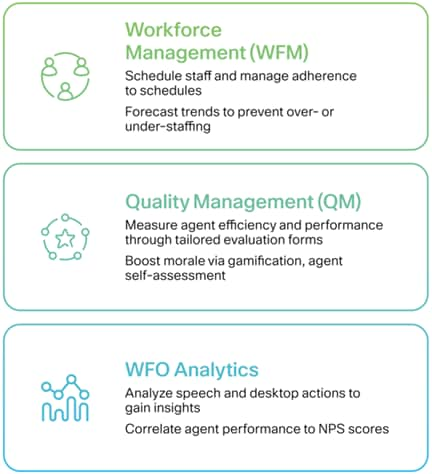
Configure agent state models explicitly: Ready, Not Ready (with reason codes), Wrap-Up, and Training. Reason codes feed directly into workforce management forecasts — if 30% of your agents select "System Issue" as not-ready, that's a routing or desktop problem, not a staffing problem.
Measuring routing effectiveness
After go-live, track these metrics weekly for the first quarter:
- Queue interval report — offered, answered, abandoned by channel and time of day
- Skill match rate — % of contacts routed to an agent with all required skills
- Cross-channel transfer rate — contacts that start on chat and escalate to voice
- Agent occupancy by channel — are chat agents underutilised while voice queues back up?
Webex CC's analytics APIs and the bundled reporting dashboards cover most of this out of the box. For clients running Genesys or Amazon Connect alongside Webex, we pipe routing events into a shared data lake for cross-platform comparison.
Common pitfalls in APAC deployments
- Holiday calendar gaps — Singapore public holidays differ from Australia and Philippines; routing scripts must reference regional calendars
- Language detection on chat — don't rely on browser locale; ask explicitly or use NLP-based detection with a fallback queue
- Over-prioritising digital — giving chat priority 10 and voice priority 3 starves phone customers during peak hours
- Ignoring after-call work — wrap-up time varies by channel; email ACW is 3–5 minutes, chat is 30 seconds
What's next
Once omnichannel routing is stable, layer in predictive routing (see our Genesys guide for the cross-platform concepts), CRM screen pop for agent context, and AI-powered chatbots on the digital entry points. The queue architecture you build now is the foundation — it doesn't need to be rebuilt when you add automation.
Planning a Webex CC deployment in APAC? Browse our use cases or talk to our team about a routing design workshop.